
When it comes to choosing the BEST microSD card for dashcam, picking the wrong one isn’t just a minor inconvenience it can mean lost footage when you need it most. Dashcams continuously record, overwrite old files, and operate in extreme temperatures, which puts far more stress on a memory card than typical use in phones or cameras. That’s why not all microSD cards are created equal for this job: you need one specifically built for high endurance, reliable write speeds, and long-term durability. In this guide, we’ll break down what matters so you don’t end up with a card that fails at the worst possible moment.
Here’s something most dashcam buyers find out the hard way.
You spend good money on a decent dashcam. You install it properly. You drive around for a few months feeling safe knowing everything is being recorded. Then something actually happens — a scrape in a car park, someone jumping a red light — and you go to check the footage.
Corrupted file. Or worse, nothing recorded at all.
The dashcam didn’t fail. The microSD card did. And it was probably a perfectly normal card that works fine in a phone — just completely wrong for a dashcam.
This guide is about making sure that never happens to you.
MicroSD vs SD — Which Does Your Dashcam Need?
Quick clarification before anything else, because this trips a lot of people up.
Almost every modern dashcam uses a microSD card — the small format, roughly the size of a fingernail. Not a full-size SD card. Most microSD cards come with a full-size SD adapter in the box, which you’d use when plugging into a laptop to review footage, but the card itself that goes into the dashcam is always micro.
MicroSD cards are more robust, better at storing data, and a more durable choice for dashcam use compared to full-size SD cards, which are better suited for devices where the card is inserted and removed infrequently.
So when you’re shopping, search for microSD specifically — and make sure the one you buy is rated for continuous recording.
Why a Regular microSD Card Will Fail in a Dashcam
This is the part most buyers skip, and it’s the most important thing to understand.
Your dashcam never really stops writing data. It records in a continuous loop — filling up the card, then deleting the oldest footage to make room for new recordings. All day, every day, in heat that regularly exceeds what most electronics are designed to handle.
Standard consumer microSD cards use TLC flash memory, which wears out quickly under continuous writing and leads to sudden failure and unreadable files. High-endurance cards use premium MLC or pSLC NAND flash memory that can survive these harsh conditions — a premium card can withstand up to 10,000 hours of continuous recording.
Standard cards — the ones marketed for phones, tablets, and cameras — are built for occasional bursts of reading and writing, not non-stop loop recording. They’ll often work fine for the first few months. Then they start throwing errors. Then they fail silently, recording nothing while displaying no warning.
The solution is a microSD card built specifically for this use case: a high-endurance dashcam microSD card.
What to Look for When Buying a microSD Card for Your Dashcam
High Endurance Label
This is the most important thing. Look for cards explicitly marketed as “High Endurance” or “Max Endurance.” These are built with more durable flash memory and tested for thousands of hours of continuous loop recording. Without this, you’re gambling.
Speed Rating — U3 or V30
For smooth Full HD 1080p video, use a card with a minimum write speed of Class 10 or U1. For UHD 4K or 2K video, you need a minimum of U3. V30 is equivalent to U3 for video purposes. Most decent endurance cards today are U3/V30, so this is rarely an issue if you’re shopping from the right category.
Capacity — How Much Do You Actually Need?
A one-minute 4K 30fps video takes up around 190 MB, while a one-minute 1080p 30fps video is approximately 65 MB. Use that as your guide:
- Single 1080p camera: 64 GB or 128 GB is plenty
- Single 4K camera: 128 GB minimum, 256 GB preferred
- Front and rear dual setup: 256 GB
- Commercial or all-day driving: 256 GB–512 GB
Temperature Resistance
Car dashboards get extremely hot, especially in summer. A quality dashcam microSD card should handle temperatures up to at least 85°C. Most high-endurance cards from reputable brands meet this — cheap generics often don’t.
Brand Reputation
Stick to Samsung, SanDisk, Lexar, or Kingston. Opting for a popular name brand doesn’t guarantee a card will last forever, but reputable manufacturers are strongly recommended — and regardless of brand, memory cards are consumable items that should be checked monthly and replaced annually.
The Best microSD Card for Dashcams in 2026
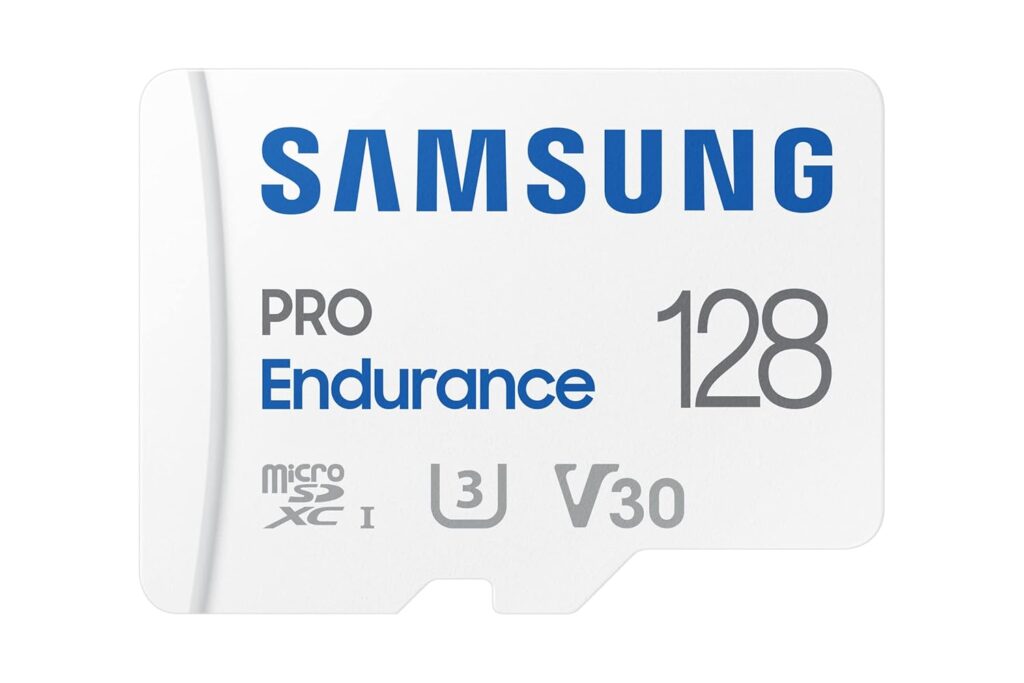
1. Samsung PRO Endurance — The One Most Experts Recommend
Ask on any dashcam forum — Reddit, DashCamTalk, anywhere — and the Samsung PRO Endurance is the card that comes up over and over again. That kind of consistent real-world endorsement means something.
It’s designed from the ground up for continuous recording applications. The flash memory inside is genuinely more durable than what you’ll find in consumer-grade cards, and it’s rated for 43,800 hours of continuous recording on the 256 GB version — roughly five years of non-stop use.
In practice it runs cool, handles parking mode without complaint, and plays nicely with every major dashcam brand. The 5-year warranty is a nice bonus too.
The 128 GB version is our top recommendation for the majority of drivers — it hits the sweet spot of capacity, price, and longevity.
Capacity: 32 GB – 256 GB Speed: U3 / V30 / Class 10 Best for: The vast majority of dashcam users
2. SanDisk MAX Endurance — When You Need Maximum Reliability
The SanDisk MAX Endurance exists for people who put their dashcam through serious use. Rideshare drivers. Long-haul truckers. Anyone running a 4K front-and-rear setup all day.
The 256 GB version is rated for up to 120,000 hours of full-HD continuous recording — that’s over 13 years. Even with 4K footage eating through capacity faster, you’re looking at a very long service life.
It handles the constant loop of writing and deleting without breaking a sweat, and the lifetime warranty means you’re covered if anything does go wrong. Honestly, if price isn’t a concern, this is the card to get — full stop.
Capacity: 32 GB – 256 GB Speed: U3 / V30 / Class 10 Best for: 4K cameras, dual-channel setups, professional and commercial drivers
3. SanDisk High Endurance — Solid Value for Everyday Use
The SanDisk High Endurance sits below the MAX in terms of endurance ratings, but for a normal daily commuter with a single 1080p camera, the difference is academic. You’ll likely replace the card before it hits its limits anyway.
It’s reliable, fast, and great value — particularly the 64 GB version, which suits almost all circumstances except high-quality dual recording.
It’s U3/V30 certified, widely available, and comes with a lifetime warranty. If you want a dependable card without paying premium prices, this is it.
Capacity: 32 GB – 256 GB Speed: U3 / V30 / Class 10 Best for: Single 1080p dashcams, occasional drivers, budget-conscious buyers
4. Lexar PLAY microSD — Best for Larger Capacities
Lexar has quietly become a serious option in the dashcam space, particularly because they offer reliable cards in larger capacities that Samsung and SanDisk sometimes don’t match on price.
It meets U3/V30/Class 10 speed requirements, performs well in 4K dashcam recording, and users report stable temperatures during extended parking mode sessions.
If you need 256 GB or 512 GB and want to save some money compared to the Samsung PRO, the Lexar range is worth a serious look.
Capacity: 64 GB – 512 GB Speed: U3 / V30 / Class 10 Best for: Higher capacity needs, newer dashcam models, value buyers
5. Kingston Canvas Go! Plus — Built for the Harshest Conditions
Most dashcam users won’t need this one. But if you drive in extreme heat or cold — think Middle Eastern summers, Scandinavian winters, or a van that sits in full sun all day — the Kingston Canvas Go! Plus is worth the extra cost.
It’s rated for a wider operating temperature than most consumer endurance cards, and it’s shock-proof, waterproof, and X-ray proof on top of that. The raw read speeds are also the fastest on this list, though for dashcam purposes that barely matters. What matters is that it keeps working when conditions are punishing.
Capacity: 64 GB – 512 GB Speed: U3 / V30 / A2 Best for: Extreme temperature environments, commercial vehicles, industrial dashcam use
Also Read Best Memory Card for Dashcam
Side-by-Side Comparison
| Card | Max Capacity | Speed | Endurance | Best For |
|---|---|---|---|---|
| Samsung PRO Endurance | 256 GB | U3/V30 | 43,800 hrs | Best overall |
| SanDisk MAX Endurance | 256 GB | U3/V30 | 120,000 hrs | 4K / dual-cam |
| SanDisk High Endurance | 256 GB | U3/V30 | 20,000 hrs | Budget / 1080p |
| Lexar PLAY | 512 GB | U3/V30 | Not stated | Large capacity |
| Kingston Canvas Go! Plus | 512 GB | U3/V30 | Not stated | Extreme conditions |
Cards You Should Absolutely Avoid
SanDisk Extreme / Extreme Pro — Sounds perfect, isn’t. These cards are designed for action cameras and drones that write in short bursts, not continuous loop recording. Multiple dashcam users report “card slow” errors after using these cards in VIOFO and other dashcams, sometimes within weeks of installation.
Samsung EVO Select / EVO Plus — Excellent phone cards. Wrong tool for this job. Not built for sustained loop recording and will degrade quickly under dashcam conditions.
No-brand Amazon cards — Counterfeit cards are rampant on online marketplaces. Many are rebranded failures with fake speed ratings. There’s no warranty, no support, and no way to know what’s actually inside.
How to Get the Most Life Out of Your Dashcam microSD Card
Buying the right card is step one. Taking care of it is step two.
Format it monthly — but do it inside the dashcam. Not on your computer. Your dashcam’s built-in format option clears the file system properly. Formatting on a PC or Mac is not recommended whenever possible — use the dashcam app or the camera’s own menu instead. This prevents the gradual file fragmentation that causes mysterious errors.
Power off before removing the card. Always. Pulling a microSD card while the camera is active corrupts the file being written — and sometimes wrecks the whole card’s file system in the process.
Don’t share it with other devices. Your dashcam microSD card should do one job. No holiday photos, no music, no documents. Mixed content fragments the storage and creates conditions for silent recording failures.
Check your footage occasionally. Once a week or so, actually play back a clip. It takes ten seconds and immediately tells you whether your card is still doing its job.
Replace it every one to two years. Replace your dashcam memory card every one to two years to avoid catastrophic failure during an accident. A fresh 128 GB Samsung PRO Endurance costs around £18–25. That’s genuinely cheap insurance.
Frequently Asked Questions
What is the best microSD card for a dashcam? The Samsung PRO Endurance is the best microSD card for most dashcam users. It’s built for continuous loop recording, handles heat well, and is compatible with virtually every dashcam brand. For 4K or dual-camera setups, the SanDisk MAX Endurance is the stronger choice.
Is a high-endurance microSD card really necessary for a dashcam? Yes. Standard consumer microSD cards aren’t built for the constant loop recording and high temperatures of dashcam use. They fail faster, often without warning, and at the worst possible time. High-endurance cards use better quality flash memory that lasts significantly longer under these conditions.
What speed class do I need for a dashcam microSD card? For 1080p recording, Class 10 or U1 is the minimum. For 4K or 2K, you need U3 or V30. Most high-endurance cards sold today are already U3/V30 rated, so this is rarely an issue if you’re shopping in the right category.
How much storage do I need in a dashcam microSD card? For a single 1080p camera, 64 GB or 128 GB is plenty. For 4K or dual-channel setups, go with 128 GB or 256 GB. If you drive professionally or want all-day coverage, 256 GB is the safe choice.
Can I use a regular microSD card in my dashcam? You can, but it will likely fail much sooner than a high-endurance card — often within 6 to 12 months of daily use. The real risk is that it fails silently, recording nothing while appearing to work fine.
How often should I replace my dashcam microSD card? Every one to two years is the standard recommendation. Flash memory degrades over time and high-endurance cards are no exception — they just last much longer than standard ones before reaching that point.
Also Read Best SD Card for Dashcam (Guide)
Final Word
The best microSD card for a dashcam isn’t necessarily the fastest or the biggest — it’s the one that keeps recording reliably, day after day, without ever letting you down when it matters.
For most people, that’s the Samsung PRO Endurance 128 GB. Buy it, format it inside your dashcam when you first install it, and replace it in a year or two. Simple as that.
If you’re running a 4K setup or a front-and-rear system, spend the extra bit for the SanDisk MAX Endurance 256 GB — the higher endurance rating is worth it for the extra workload those setups create.
Either way, the days of grabbing whatever cheap card is on sale are over. Your dashcam is only as reliable as the card inside it.