
OLED vs IPS vs VA—these three display technologies dominate the screen market in 2026, but choosing the right one isn’t as simple as it seems. Each panel type offers unique strengths, from OLED’s perfect blacks and stunning contrast to IPS’s color accuracy and wide viewing angles, and VA’s impressive contrast at a more affordable price point. Whether you’re a gamer, content creator, or everyday user, the panel you choose directly impacts your experience. In this detailed comparison, we’ll break down OLED vs IPS vs VA across all key factors—helping you understand which display truly deserves your investment.
The Decision That Determines Everything About Your Screen
Most people buy a monitor or TV the wrong way. They look at size, resolution, refresh rate, and price — and treat the panel technology as a footnote in the spec sheet. That’s a mistake, because the panel type sitting behind everything else is the single decision that determines how blacks look, how fast motion renders, whether colours hold up when you shift your viewing angle, and how the screen performs five years from now.
In 2026, the three dominant technologies — OLED, IPS, and VA — have each evolved significantly. The old shorthand (“IPS for colour, VA for contrast, OLED for luxury”) is no longer accurate enough to be useful. Each technology has been pushed forward by new manufacturing techniques, AI-enhanced processing, and more aggressive competitive pressure. And the gaps between them have both narrowed and widened in different areas simultaneously.
This article covers all of it — with actual numbers, real-world context, and direct answers to which panel belongs in which situation. No marketing language, no hedging.
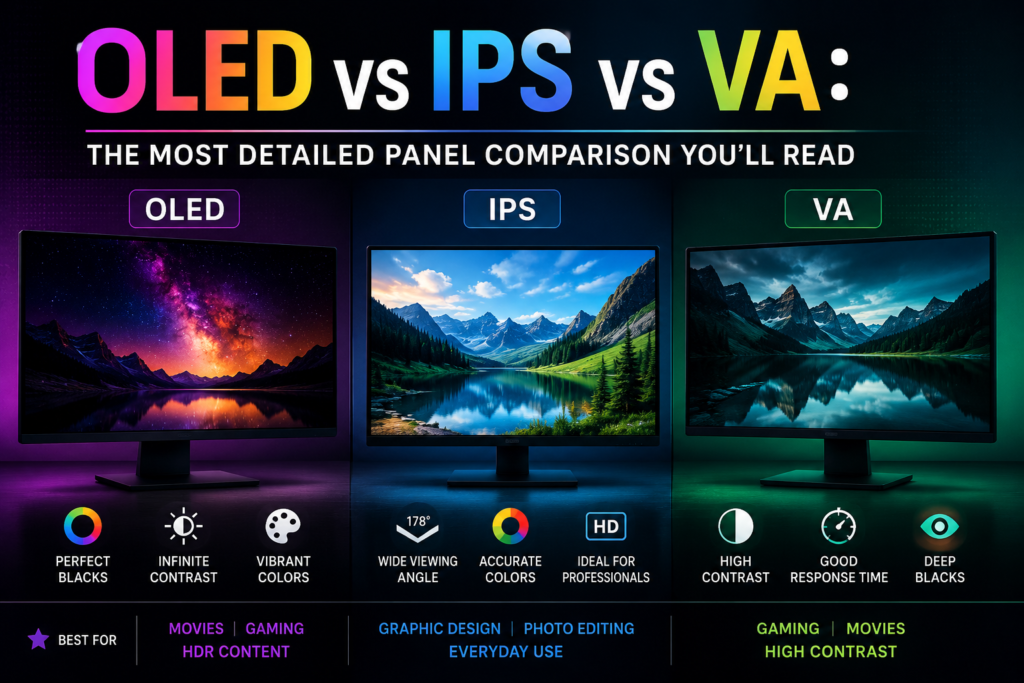
How Each Technology Actually Works
Before comparing them, it’s worth being precise about the fundamental architecture of each panel type. The differences in real-world performance flow directly from how they’re built.
IPS (In-Plane Switching) is a type of LCD. It works by using a backlight — a constant light source behind the panel — that shines through liquid crystal molecules aligned parallel to the glass surface. This alignment gives IPS its defining characteristic: consistent colour from wide viewing angles, typically rated at 178 degrees horizontally and vertically. The backlight is always on, which means IPS panels cannot produce true black — only a very dark grey.
VA (Vertical Alignment) is also an LCD technology, but the liquid crystals are oriented differently — they stand vertically when the pixel is “off,” which blocks the backlight far more effectively than IPS. Think of it as a shutter that closes more completely. This is why VA panels produce dramatically deeper blacks than IPS without requiring additional local dimming hardware. The trade-off is that the vertical crystal alignment responds more slowly to voltage changes, creating the “dark smearing” problem VA has long been associated with.
OLED (Organic Light-Emitting Diode) is a fundamentally different technology. There is no backlight. Each pixel is its own light source — an organic compound that emits light when electricity passes through it and goes completely dark when the electricity stops. True black is not a deep dark grey with a backlight behind it. It is zero light, zero power, nothing. This is the architectural advantage that no amount of engineering can give a backlit LCD, which is why OLED’s contrast figures are measured in entirely different units.
Contrast Ratio: Where the Real Visual Gap Lives
If there is one specification that separates these three technologies most visibly in real use, it is contrast ratio.
IPS panels align liquid crystals parallel to the screen surface and deliver wide viewing angles and stable colour, but their contrast ratio typically sits around 1,000:1. VA panels, by stacking crystals vertically, achieve native contrast ratios of 3,000:1 to 5,000:1 — producing deeper blacks without relying on local dimming. That isn’t a marginal difference. On a dark screen, an IPS panel will show a noticeably lighter, greyer black compared to VA. In a dim room watching a film with dark scenes, the gap is immediately visible to the naked eye.
VA panels routinely hit 3,000:1 to 6,000:1 contrast ratios in 2026, while IPS and other standard LCD panels typically achieve around 1,000:1 — producing visibly deeper blacks and richer shadow detail.
OLED sits in a different category entirely. Because each pixel can switch off individually, OLED delivers what the industry calls “infinite contrast ratio” — not because the marketing department decided to be dramatic, but because the denominator (black level) is genuinely zero. No backlight, no leakage, no grey wash. QD-OLED panels in 2026 produce peak brightness of 1,000–1,300 nits alongside those true black levels, while W-OLED hits 800–1,000 nits peak with slightly better near-black uniformity.
One critical nuance about contrast in real-world conditions: VA’s high contrast advantage and OLED’s perfect blacks only matter in dim or dark rooms. In a bright room with lots of ambient light, IPS performs just as well visually because the ambient light already washes out the black level differences. This is a point that most panel comparisons bury or skip entirely. Your room lighting is as important as the panel technology when it comes to perceived contrast. Alibaba
Response Time and Motion Clarity: The Speed Story
Response time is the measurement of how quickly a pixel can change from one colour to another. Faster response means sharper motion, less ghosting, and less smearing during fast-moving scenes.
OLED features sub-0.1ms grey-to-grey response times — visibly superior to any LCD technology. Fast IPS panels achieve around 1ms, which is excellent for competitive gaming, while VA panels often suffer from smearing in dark transitions. Anker
That VA dark smearing problem deserves a specific explanation because it is misunderstood. VA smearing has a specific cause: dark pixel transitions take around 20ms on many VA panels, in a display where 144Hz means each frame lasts only 6.94ms. The pixel is still transitioning from one dark shade to another when the next frame has already arrived.
The result is a visible trail or smear on dark backgrounds during fast motion — something that is barely noticeable in a slow RPG but genuinely distracting in a fast-paced FPS. Dark-to-dark transitions still take 15–25ms on most VA panels in 2026 despite improvements, and marketing teams tend to emphasise best-case GtG numbers while the slow transitions create noticeable smearing in dark game scenes.
IPS, for its part, has improved dramatically in recent years. The latest AI-enhanced IPS panels in 2026 use machine learning algorithms to predict pixel transitions and reduce ghosting, making them viable for both competitive gaming and content creation. Fast IPS variants — Nano IPS, IPS Black, and AUO AHVA — each address specific historical weaknesses of the technology while preserving its viewing angle and colour accuracy advantages.
Also Read How to Choose the Right Smart TV
Colour Accuracy and Viewing Angles: IPS Still Leads
For professional colour work — photo editing, video grading, graphic design — IPS remains the reference standard. Its liquid crystal alignment produces consistent hue reproduction across viewing angles that neither VA nor most consumer OLED panels can fully match.
IPS panels align liquid crystals parallel to the screen surface, delivering wide 178-degree viewing angles and stable colour from off-centre positions — making them the default choice for multi-monitor setups and colour-critical tasks.
VA panels have a known colour shift problem that is absent from IPS. When you view a VA screen from even a moderate angle — roughly 30 to 45 degrees off centre — saturation drops and contrast shifts noticeably. For a single-person setup where you’re always sitting directly in front of the screen, this is a non-issue. For shared viewing, collaborative work environments, or multi-monitor configurations where monitors are angled, it’s a genuine limitation.
OLED’s viewing angle performance is comparable to IPS — wide, consistent, and stable. Where OLED differs is in its subpixel structure. Most OLED panels use a non-standard subpixel arrangement (WRGB in LG’s W-OLED, or a triangular RGB in QD-OLED) rather than the standard RGB stripe used in IPS. This can create slightly softer text rendering at smaller font sizes — a real consideration for anyone who reads or writes extensively on the display. OLED text clarity differences between subpixel layouts are worth checking in reviews if you code, write, or read all day.
HDR Performance: The Real Story Behind the Certification Badges
HDR is one of the most abused terms in the display industry, and understanding how each panel type handles it is essential before spending money on an HDR-certified screen.
HDR400 on an IPS panel is a certification badge, not a meaningful feature. It means the panel hits 400 nits peak brightness — barely above SDR levels — with no local dimming. Real HDR starts at HDR600 with Mini-LED, or any OLED panel. Many buyers purchase an “HDR” IPS monitor expecting a dramatic visual upgrade and are left confused when HDR mode looks flat or washed out. That’s not user error — it’s a marketing category that encompasses genuine HDR capability and a glorified SDR screen under the same branding.
IPS and VA panels require full-array local dimming (FALD) zones to achieve comparable HDR performance, with 2026 models featuring up to 2,304 dimming zones in premium displays. Mini-LED VA panels represent the strongest challenger to OLED for HDR performance in the LCD space. The Samsung Odyssey Neo G8 with Mini-LED VA hits 2,000 nits peak and carries HDR2000 certification — figures that approach OLED territory for bright highlight performance while preserving VA’s strong native contrast as a base.
OLED HDR is a fundamentally different experience to LCD HDR because the contrast between the brightest and darkest elements of a scene is real rather than simulated. A star field on OLED is literal black space with bright white points. On an LCD, even with local dimming, it’s a series of dimming zones that produce an approximation. The OLED version is what it actually looks like.
Also Read BEST 55 Inch Smart QLED TV in India
The Burn-In Question: What the Data Actually Says in 2026
OLED burn-in is the most discussed concern around the technology — and the most misunderstood. In 2026, the data is extensive enough to answer this properly rather than relying on fear or reassurance.
A 21-month, 5,000-hour burn-in test on an MSI MPG 321URX QD-OLED found only 2% overall brightness degradation — peak output dropped from 243 nits to 238 nits. Burn-in artefacts appeared primarily during the first six months and then largely stabilised, with the degradation rate slowing significantly after that initial period.
Burn-in is not caused by using an OLED too much. It is caused by displaying the same static element in the same spot for thousands of accumulated hours. The organic compounds in each pixel degrade at different rates depending on how hard they are driven, and a bright static logo hammers the same pixels relentlessly while surrounding pixels age normally. That differential ageing is what produces a ghost image.
If you vary your content — browse the web, watch movies, play different games — the risk is statistically negligible for the typical lifespan of the product. The bigger risk is watching a single news channel with a static ticker for 12 hours a day, every day.
Modern OLED panels include automatic mitigation systems that most users never configure manually. OLED image cleaning runs automatically when you power off the monitor, searching for pixels that have not fully turned off and scanning for signs of burn-in and wear — a process taking around five to ten minutes.
For long-term life expectancy: modern OLED screens can last 30,000 to 100,000 hours before significant burn-in becomes an issue — often exceeding a decade of typical daily use, depending on panel technology, brightness settings, and content type.
The honest verdict: burn-in is a real phenomenon, not a myth. But for typical gaming, entertainment, and general computing use, even under worst-case usage patterns, you can expect an OLED panel to last at least three years before burn-in becomes problematic. With more mixed usage or lower daily screen time, that window only extends. IPS and VA have zero burn-in risk — that advantage is real for static desktop productivity work, but it matters far less for gaming and media consumption than the OLED anxiety online tends to suggest.
IPS Glow: The Problem That Rarely Gets Honest Coverage
IPS panels have their own version of the uniformity problem, and it gets far less attention than OLED burn-in despite being universal and unavoidable.
IPS glow is a known limitation — a hazy, glowing effect visible in the corners of IPS panels in dark environments. It is not the same as backlight bleed, though both can occur. IPS glow is inherent to the technology. Mini-LED IPS panels partially address this through local dimming zones, but it does not disappear entirely.
IPS panel brightness also degrades subtly over time — not dramatically, but after two to three years of heavy use, panels that shipped at 400 nits often measure around 360 nits.
If your setup involves a bright, well-lit room, IPS glow is largely invisible. If you use your monitor in a dark room — gaming late at night, watching films — IPS glow in the corners of a dark scene is a persistent reminder of the panel’s LCD architecture. You can minimise it by reducing brightness, but you cannot eliminate it without switching panel technology.
Pricing: Where Each Technology Sits in 2026
VA sits at the budget tier — the cheapest way to get a gaming monitor, with 27-inch 1440p 165Hz VA panels available at entry-level pricing. IPS ranges from budget to mid-range, with a 27-inch 1440p 180Hz IPS sitting in the mid-range and high-refresh 240Hz+ IPS monitors pushing into the upper mid-range. W-OLED sits in the premium bracket, with 27-inch 1440p W-OLED models at a significant premium. QD-OLED sits above that, as the most expensive option currently available. MultCloud
The cost-per-performance calculation depends entirely on what you’re optimising for. For pure dark-room contrast on a tight budget, VA delivers visuals that a same-priced IPS genuinely cannot match. For professional colour work, mid-range IPS is significantly more practical than premium OLED. For the absolute best gaming experience with no compromises on motion clarity or HDR, QD-OLED justifies its premium for the right user.
Also Read MacBook Air vs Dell XPS: Which Laptop Should You Buy?
Quick Spec Comparison at a Glance
Contrast Ratio IPS: ~1,000:1 native. VA: 3,000:1–6,000:1 native. OLED: Effectively infinite (true black).
Response Time IPS: ~1ms (Fast IPS). VA: 15–25ms in dark transitions. OLED: Sub-0.1ms.
Viewing Angles IPS: 178° — excellent. VA: Moderate, shifts with off-centre viewing. OLED: Wide and consistent.
Colour Accuracy IPS: Industry reference standard. VA: Good, not professional grade. OLED: Excellent, minor text subpixel caveat.
Peak Brightness IPS: 300–600 nits standard, higher with Mini-LED. VA: 200–400 nits standard, up to 2,000 nits with Mini-LED. OLED: 800–1,300 nits depending on type.
Burn-In Risk IPS: None. VA: None. OLED: Real but manageable for typical use.
Price IPS: Budget to mid-range. VA: Budget to mid-range (lower than equivalent IPS). OLED: Premium to flagship.
Who Should Buy Which Panel
Buy IPS if: you work with colour professionally, use your monitor in a bright room, run a multi-monitor setup where consistent off-axis colour matters, or want a reliable all-rounder that handles gaming and productivity without any long-term concerns. IPS is the safest, most versatile choice for the widest range of use cases.
Buy VA if: your primary use is dark-room gaming or home cinema viewing, you’re on a budget and want the best possible black levels without paying OLED prices, and you’re playing slower-paced or atmospheric games where VA’s weak point (dark smearing) won’t surface. A good VA panel in a dark room genuinely looks spectacular for films and moody RPGs. Just do not use it for competitive FPS titles expecting clean motion.
Buy OLED if: you want the best image quality available right now, period — and you understand what you’re managing. OLED is for people who game in dim rooms and want real HDR, who watch cinema seriously, who play atmospheric single-player games, and who want motion that no LCD can match. Enable pixel refresh, vary your content, avoid leaving static elements on screen for hours, and OLED will serve you exceptionally for years.
Buy QD-OLED specifically if: you want the widest colour gamut and highest peak brightness available in any OLED format — and your budget can reach that tier. QD-OLED pairs Samsung’s quantum dot colour conversion layer with OLED’s self-emissive pixels, producing a wider colour gamut and higher peak brightness than W-OLED, making it the strongest all-around gaming panel available in 2026 if budget is not a constraint.
The Final Word
There is no universally correct answer in the OLED vs IPS vs VA debate — which is exactly why the question keeps generating traffic and confusion. Each technology makes a different set of trade-offs, and the right panel depends on how and where you use your screen.
The clearest summary that holds up in 2026: OLED is the best panel technology for entertainment and gaming in controlled lighting, and its burn-in risk has been comprehensively tested to the point where it’s manageable for most real-world uses. IPS is the most versatile technology for work, professional colour, and bright-room use — consistent, reliable, and free of any long-term concerns. VA is the dark-room contrast specialist on a budget — visually impressive in its element, frustrating outside of it.
Buy for how you actually use your screen, not for the spec sheet numbers that look most impressive in a side-by-side comparison. The panel that fits your setup is the right one.