Video quality
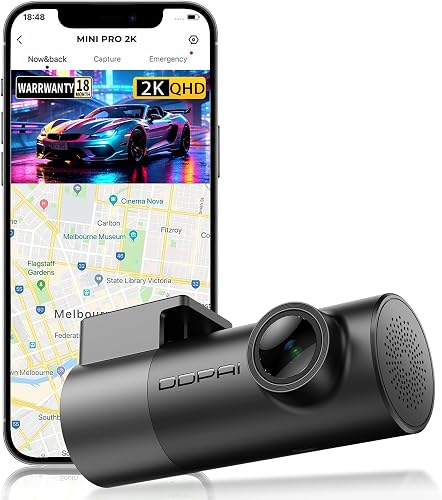
The Mini records 1920 x 1080 at 30 frames per second from a 2 MP sensor through a 140 degree lens. That is the standard for a basic dash cam. It is enough to show what happened, who had the right of way and the general scene. Whether a number plate is readable at a distance depends on speed, light and the lens, and 1080p from a wide lens gives less detail than the 2K and 4K cameras now common in the price range.
The aperture appears as F2.0 in Indian launch coverage and F2.2 on a retail spec page, so the exact figure may differ by batch. Either way, the camera lists no night mode, and we have no night footage to show you. If night driving matters, read our dash cam guide for models with larger sensors.
Recording features
- Loop recording. When the card is full the camera overwrites the oldest clips, so it never stops recording. DDPAI quotes about 24 hours on a 128 GB card.
- G-sensor. A 3-axis sensor detects a sudden impact and locks the current clip so loop recording does not erase it. Sensitivity can be changed in the app.
- Supercapacitor. Instead of a lithium battery, the camera uses a supercapacitor, which copes better with heat inside a parked car. That matters in an Indian summer.
- Card. Use a high-endurance microSD card, Class 10 or better. A card is not included.
Wi-Fi and the app
The camera has no listed screen. You pair your phone to its 2.4 GHz Wi-Fi and use the DDPAI app to watch a live preview, play back and download clips, change settings and update firmware. This keeps the camera tiny, but it also means you need your phone to review footage. Download important clips straight after an incident, before they are overwritten.
DDPAI describes parking monitoring and time-lapse as features that work with a hardwire kit sold separately. Without it, the Mini records only while the car is on. If you want parking surveillance, budget for the kit and set its voltage cut-off so the camera does not drain the car battery.
What it does not list
We found no GPS, ADAS (lane and collision alerts), voice control or display on the spec pages. If you need these, look at a camera that lists them, such as the Qubo Pro 4K, or read our Qubo vs DDPAI comparison.
Specifications
| Feature |
Listed spec |
| Resolution |
1920 x 1080 at 30 fps |
| Image sensor |
2 MP CMOS |
| Field of view |
140° |
| Aperture |
F2.0 to F2.2 (sources differ) |
| Connectivity |
Wi-Fi 2.4 GHz, DDPAI app for Android and iOS |
| G-sensor |
3-axis, adjustable |
| Loop recording |
Yes, about 24 hours on 128 GB |
| Memory card |
microSD up to 128 GB, Class 10 or better, not included |
| Parking mode |
With a separate hardwire kit |
| Power |
12 V car socket, supercapacitor |
| Dimensions |
32 x 87 mm |
| GPS, ADAS, voice control |
Not listed |
Installing it
- Clean the windscreen near the mirror and stick the camera where it does not block your view.
- Run the cable along the edge of the windscreen and down the pillar to the 12 V socket, tucking it under the trim.
- Insert a formatted microSD card and switch on the car.
- Install the DDPAI app, connect to the camera's Wi-Fi and set the date, time and G-sensor sensitivity.
- Do a short test drive and check the playback to confirm the angle and the picture.
Newer DDPAI Models With 2K Video
If 1080p is not enough, DDPAI also sells newer dash cams with 2K video. We have not reviewed these, and the cards below list only what the Amazon titles state. Check the full specifications, parking mode support and current prices before you buy.