Our opinion
The most useful split is simple: do you want a lock that works on its own, or one you can open from your phone?
For a lock that works on its own, we would pick the Godrej Catus Touch Plus at ₹11,725 if you want fingerprint access, or the plain Catus Touch at ₹4,530 if a PIN is enough. Both have 4.5 ratings, a 3-year warranty and come from a company with a long history in locks. Neither depends on an app staying online.
For a lock you can control from a phone, the Atomberg Azhero is the one we would trust most at ₹10,499. It lets you send a one-time PIN to a visitor, set periodic codes for staff, and stores its app data in India. The Qubo Essential has the most buyers behind it, but its listing says remote unlocking needs an extra Qubo doorbell or a Wi-Fi gateway.
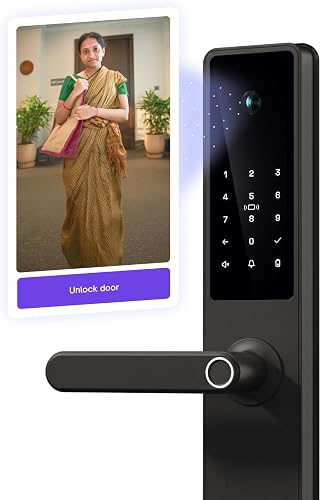
The Native Lock Pro is the only lock here with a camera. It makes sense if you want to see a visitor before unlocking. If you do not, it costs about ₹7,000 more than the Atomberg.
How to choose a smart lock for your door
1. Check your door first. This decides more than anything. Most of the locks above are made for wooden doors. The Qubo needs at least 3 cm of thickness and is not for double doors. The Yale supports 40 to 65 mm. A metal security door, a glass door or a double door usually needs a specific model, so confirm with the seller before ordering.
2. Choose how you want to open it. Fingerprint is the most convenient. A PIN is the best for guests. An RFID card or tag suits domestic help or tenants. The mechanical key is your backup. More methods are not always better: the extra ones are only useful if someone in your home will use them.
3. Decide whether you need remote access. Locks that unlock from a phone anywhere need a gateway or Wi-Fi, and an internet outage can switch off that feature. The offline methods keep working. If you do not travel often or let people in remotely, you can skip this feature and save about ₹5,000.
4. Look at the warranty and who will repair it. Godrej, Yale and Native give 3 years, Atomberg and Qubo 2 years. Check that the brand has a service centre or technician in your city, and that free installation covers your pincode.
5. Plan for power. All of these run on batteries (the Qubo on 4 AA cells, rated for over 12 months on the listing). Replace them at the first low-battery warning, and keep the key or the emergency power terminal in mind for the day they do run out.
6. Think about your family. If elderly relatives or children will use the lock, a keypad or a key is easier than an app. If you have tenants or domestic help, a lock with time-limited codes saves you from changing keys each time.
Safety and privacy in plain terms
A smart lock is only as strong as its weakest way in. In practice, three habits matter most: change the default PIN, do not share one PIN with everyone, and delete old fingerprints, cards and codes when someone leaves. For app-based locks, use a strong password and keep the app updated. Locks that disable entry for 3 minutes after 3 wrong attempts, such as the Godrej and Yale models, make PIN guessing impractical.
Before you pay, also read what the listing says about the physical lock. The bolt count and body material matter as much as the electronics. A lock with three dead bolts, such as the Godrej Catus Touch Plus, is harder to force than one with a single latch.
Quick picks by situation
| If you want |
Pick |
| The cheapest reliable lock |
Godrej Catus Touch (₹4,530) |
| Fingerprint, no app, wooden door |
Godrej Catus Touch Plus (₹11,725) |
| Remote OTPs and periodic codes |
Atomberg Azhero (₹10,499) |
| The biggest review base |
Qubo Essential (₹9,490) |
| A camera on the lock |
Native Lock Pro (₹17,499) |
| Upgrading an existing door lock |
Yale YDME 100 NxT (₹11,499) |